Let’s deep dive in the world of bank connectivity options. Web banking, host to host, SWIFT, EBICS, APIs, aggregators. Six paths. Today we walk one of them in detail.
Host to host, sometimes written as H2H. The most common automated bank connection in corporate treasury. This article assumes you know nothing technical, and ends with you knowing exactly what host to host is, how it works under the hood, what setting it up really involves, and what goes wrong.
What host to host actually is
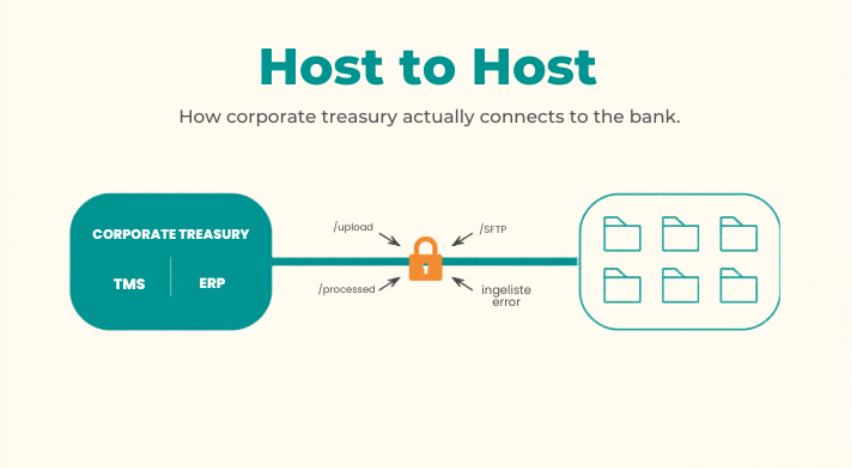
Host to host is a direct, automated file exchange between your treasury system/ERP/self-managed SFTP and your bank’s system. Files containing statements come down. Files containing payment instructions go up. Both happen on a schedule, without anyone logging into anything.
A useful analogy: web banking is the post office. You walk in, you wait in line, you collect your mail, you drop off outgoing letters, you walk out. Every day. Host to host is the dedicated courier service that picks up and delivers automatically while you sleep.
A slightly more technical version: there is a folder on the bank’s server. Your system has permission to read from it and write to it over a secure connection. The bank’s system puts statement files into a folder where you can download them. You put payment files into a folder where the bank picks them up.
That is the whole concept. It fits in three sentences. Everything else is mechanics.
How it actually works
The connection runs over a protocol called SFTP. SSH File Transfer Protocol. It is the same family of technology that lets a system administrator log into a remote server securely. For our purposes you can think of it as “encrypted file copy between two computers.”
Three things make SFTP work in a bank context.
- Identity. Your system needs to prove it is yours. This is done with a cryptographic key pair, not a password. Your IT team generates two files on your side: a private key and a public key. The private key stays with you, forever. The public key gets sent to the bank. When your system connects, the bank checks that you hold the matching private key. If you do, access granted. If not, rejected. This is more secure than passwords because the private key never travels across the internet, and there is nothing to phish.
- Address. The bank gives you a hostname (something like sftp.examplebank.com) and a port number. Your system uses these to reach the bank’s server.
- Permission. The bank’s firewall only accepts connections from approved IP addresses. You give them your IP, they whitelist it. Your firewall does the same in reverse: only allows outbound connections to the bank’s IP. This is double protection on top of the key.
Once your system is connected, it sees folders. Typically something like:
- /inbound (where you drop payment files)
- /outbound (where the bank puts statements for you to pick up)
Your system uploads, downloads, and moves on. The bank’s system processes asynchronously and drops responses back into the relevant folders.
That is the technical core. Everything else is configuration, scheduling, and file formats.
What you actually send and receive
This is where treasury and IT often talk past each other, so let me be concrete.
For statements (bank to you):
- MT940 is the SWIFT standard end of day statement. Plain text with tags. You will see lines starting with :20: (transaction reference), :25: (account number), :60F: (opening balance), :61: (transaction), :62F: (closing balance). Around since the 1980s and still the workhorse.
- MT942 is the same idea but intraday. Contains transactions since the last MT940.
- CAMT.053 is the ISO 20022 equivalent of MT940. XML format, more structured, more detail per transaction. Slowly replacing MT940 as banks modernize.
- CAMT.052 is the intraday equivalent of CAMT.053.
- CAMT.054 is a transaction-level notification sent when a single payment hits the account. Near real time.
- BAI2 is the US format. If you bank in the United States, you will see this.
For payments (you to bank):
- pain.001 is the ISO 20022 payment initiation message. XML format. You list the payments, the bank executes them.
- pain.002 is the bank’s response: which payments were accepted, which were rejected, and why. It’s called Acknowledgment file.
- MT101 is the older SWIFT format for payment requests, still used by some banks. To be disconnected November 2026.
You do not need to memorize these. You need to know they exist, that each bank supports some subset of them, and that your TMS or ERP needs to be configured to produce exactly the formats your specific banks accept. “We support ISO 20022” from a vendor means nothing until you check which specific message types and which version.
How you actually set it up
Now the real process, step by step.
Step one. You decide what you want. Statements only, or statements plus payments. Which accounts. Which formats. Which schedule (end of day only, or intraday as well). This sounds obvious, but skipping it is the most common cause of project delays. The bank will ask all of this on day one. Have the answers ready.
Step two. You contact the bank. Your relationship manager or your cash management contact. Tell them you want a host to host connection. They route you to the bank’s implementation team. Depending on the bank it is called electronic banking, e-banking, treasury services, or cash management implementation. This is the team that does the actual technical work, and it is rarely the same team your relationship manager sits in.
Step three. The bank sends a questionnaire. You fill in company information, technical contact (the person at your end who will exchange keys and addresses, usually someone in IT), accounts to onboard, formats needed, expected daily volume, expected daily file sizes. Honest answer here matters: if you underestimate volume, the bank may put you on a smaller server with rate limits you will hit on day one of production.
Step four. Documentation exchange. The bank sends their technical specifications. It contains the file naming convention (specific to each bank, something like COMPANYID_YYYYMMDD_HHMMSS_PAIN001.xml), the folder structure, the schema details, the encryption requirements (some banks want PGP encryption applied on top of SFTP for extra protection), the service window, and the SLAs. Read it. Or have IT read it. Or have your TMS vendor read it. Someone has to actually read it.
Step five. Key generation and exchange. Your IT generates an SSH key pair. They send the public key to the bank, often through a secure portal or to a designated email. The bank sends back the hostname, port, and your username on their system. Some banks accept modern Ed25519 keys, some still require RSA with a minimum length like 4096 bits. The bank’s documentation will say.
Step six. IP whitelisting. You give the bank your outbound IP addresses. They whitelist them on their firewall. They give you their inbound IP addresses. You whitelist them on yours.
Step seven. Test environment connection. Almost every bank has a UAT or sandbox environment separate from production. You connect there first. Send test files, often using dummy data the bank provides. Verify that files are received, parsed, and acknowledged. Test what happens when you send a malformed file (you want to see how errors are reported, because in production you will see them). The bank’s team will usually be on a call with you the first time. After that, you are on your own.
Step eight. Production go live. Bank confirms test success. Production credentials issued. Production IP whitelisted. You send the first real file. Watch closely for a week. Reconcile what you sent against what the bank confirmed. Catch issues early.
What goes wrong
Setup phase failures: firewall change requests stuc, key format mismatch (the bank wants RSA, your team generated Ed25519), username case sensitivity issues (yes, in 2026), bank’s implementation team overloaded, your file marked “queued” for three weeks, different teams at the bank not talking to each other (relationship manager promises one thing, implementation team does another, and you find out by accident).
Production failures: file rejected because of schema validation (you used a tag the bank does not support, even though ISO 20022 allows it), file rejected because of wrong filename pattern, connection refused because your SSH key expired (some banks rotate keys every twelve to twenty four months and do not always remind you in time), “Duplicate file” error because you uploaded the same filename twice and the bank does not allow overwrites, bank service window: some banks take SFTP offline between 22:00 and 02:00 their local time, and your scheduler runs at 23:30.
Reconciliation failures: statement received with a different reference field than expected, so your TMS does not match it to the original payment. Payment confirmation comes in CAMT.054 but your reconciliation is configured for MT940 only. Bank renames a field in what they call a “minor update” and your parser silently breaks. You only notice at month end when accounts do not tie.
None of these are deal breakers. All of them happen.
What it costs
The connection itself is usually free from the bank. Banks want you on H2H. It reduces their support cost and increases your stickiness. The cost sits on your side.
What you pay for: internal IT time to configure servers, schedulers, firewalls, and monitoring. TMS license fees if you use one. Project time across treasury, IT, and bank coordination, hours of internal effort per bank for the connection. Ongoing maintenance, which means a department will monitor the connections and react when something breaks.
When H2H is the right choice
Two to ten core banks. Stable relationships you do not change often. Volume that justifies the setup effort. IT support available. End of day plus intraday is fast enough for your business.
When it is not the right choice. One bank only: web banking is enough, do not overengineer. 10+ plus banks: SWIFT or an aggregator scales better. Real time data needed for treasury operations: use an API. No IT support and no TMS vendor: use an aggregator and let them do the plumbing.
The honest framing
Host to host is the workhorse of corporate bank connectivity. Not glamorous. Not the future. But it is what most treasury teams run on for their core banking relationships, and it works reliably once it is set up.
The pain is in the setup. The operation is boring, which is exactly what you want it to be.
The next article in this series goes into SWIFT for corporates.
Enjoy!
Treasury tech insights. No fluff.
One email per week. Build logs, tools, and opinions from the trenches.
Subscribe →